TL;DR
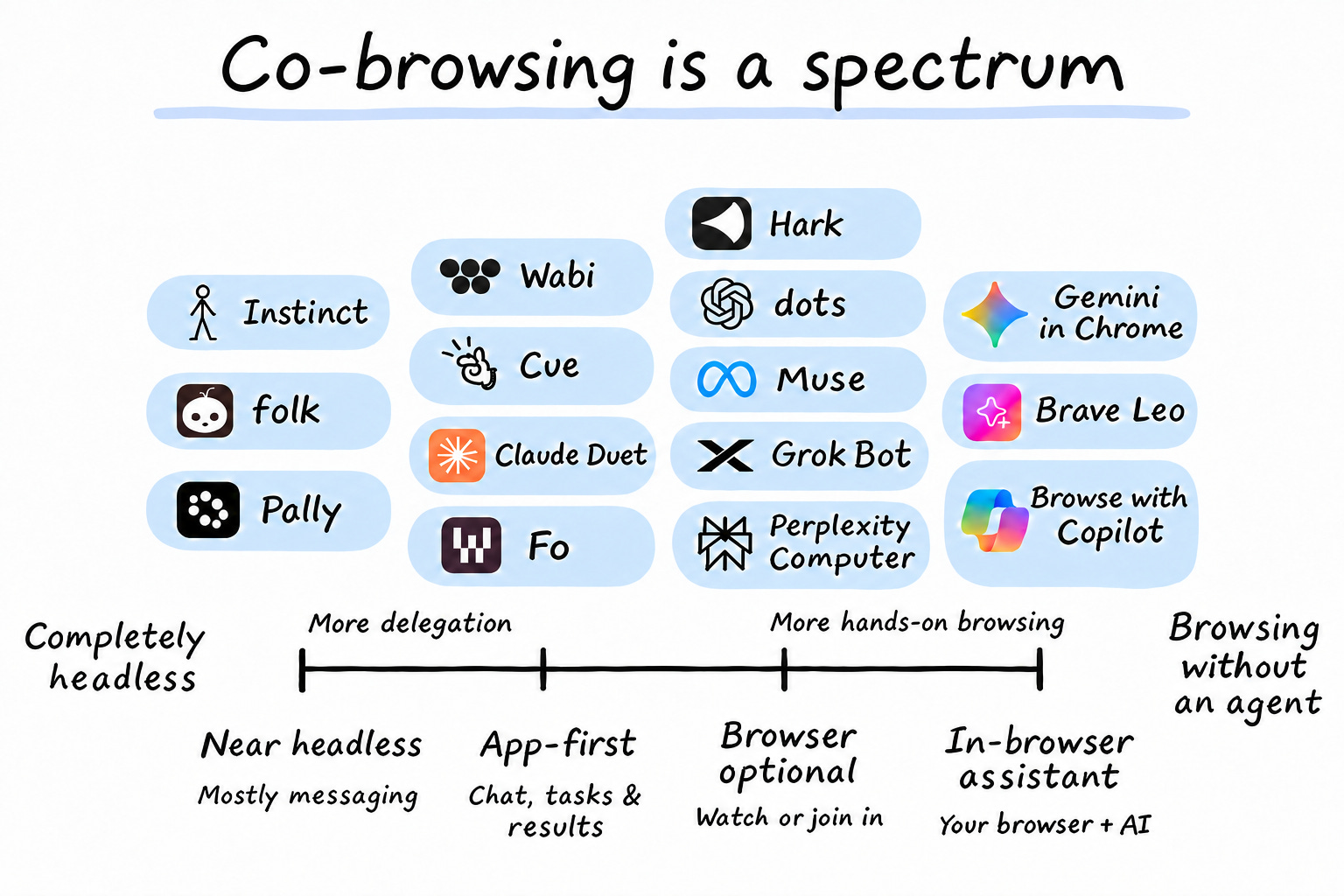
Headless means you interact only with the AI assistant’s chat or app, while the websites it uses stay behind the scenes.
Co-browsing means you use the websites too, with the assistant doing part of the work. You can step in for one decision or browse together throughout.
It’s becoming the biggest category in agentic commerce because people want to keep the enjoyable parts of shopping and booking while handing over the hassle.
When the assistant uses your existing browser - sometimes the agent takes over, sometimes it is the user. This blurs the lines of what is legitimate behavior, how websites create policies blocking automated activities without disrupting legitimate user co-browsing behavior, which is overall great for websites.
Different AI assistants have different visual interfaces for using them - for example Instinct is near-headless: you mostly interact through messages, but you can open its links and browse the websites yourself. Gemini in Chrome sits close to normal browsing, with an assistant alongside you in the browser. You might delegate almost everything, step in to choose a hotel, or browse together throughout.
On Airbnb’s latest earnings call, Brian Chesky said people still want to browse, pointing to guests looking through dozens of listings and 25-plus photos. He described browsing Airbnb during the workday as a form of escapism, which gets at why choosing a place can be part of the vacation itself. You can want an assistant to compare prices and check cancellation policies while still wanting to look at the pool and pick the house yourself.
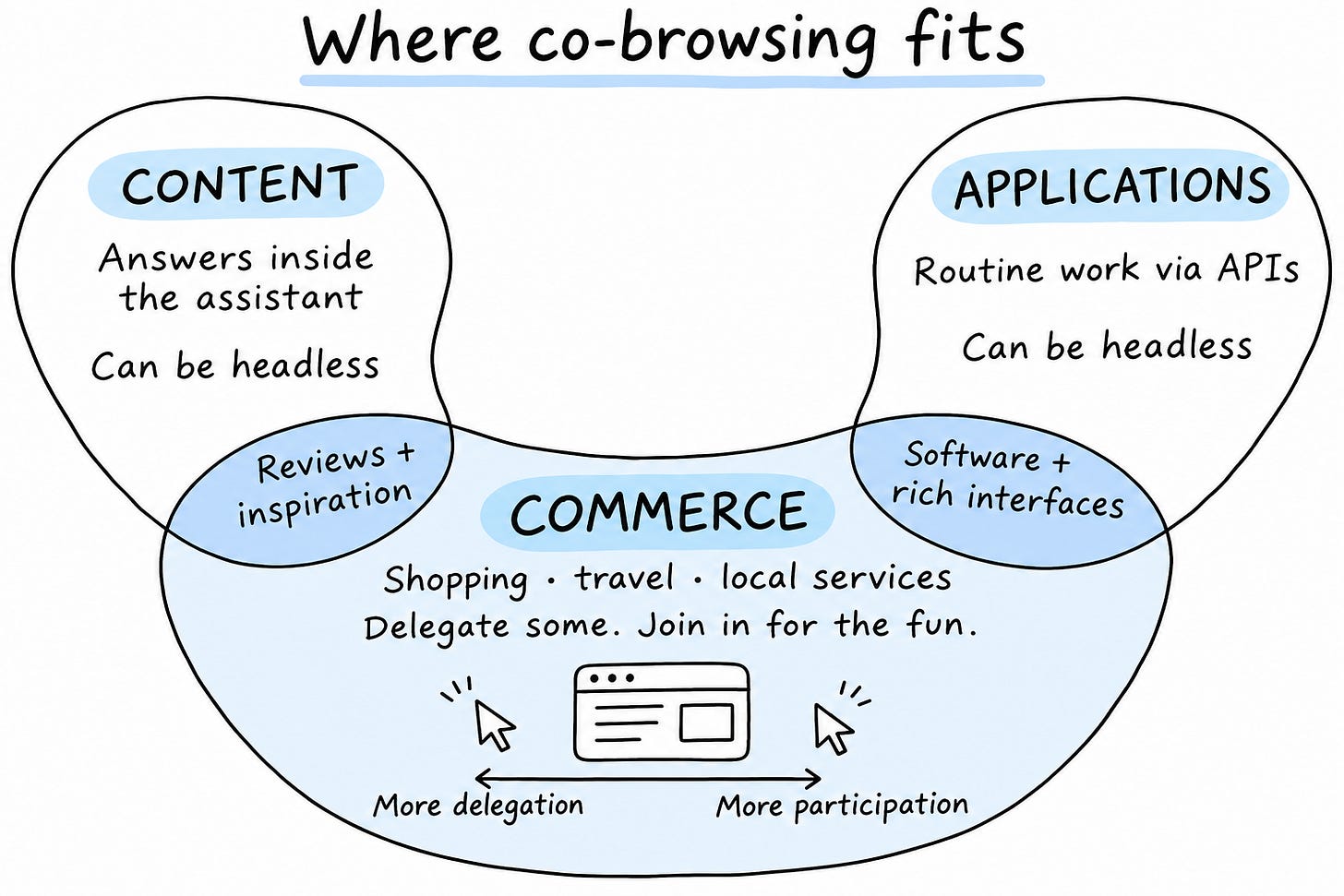
Think of content, commerce, and applications as three overlapping parts of the internet. Consuming content as an answer or summary inside the AI app without visiting the original publisher can work headless. That is why so many publishers are seeing a decline in traffic because of AI, and they need to sort out their business model because of that. Routine application work can go the same way, with an assistant updating your CRM or moving information between systems through APIs so you get the result without opening the application.
Content and routine application work sit at the two ends of a horseshoe, where the original interface can disappear from the experience. Commerce sits around the bend with its mix of enjoyable choices and boring tasks. The edges overlap because reviews lead to purchases, people buy software, and applications for music, design, or planning can be enjoyable places to spend time.
Some choosing will happen inside the assistant’s own visual interfaces too (e.g. this is how ChatGPT Apps work - they render visuals inside ChatGPT). Live room selectors, seat maps, and product configurators also give people reasons to open the actual site, and co-browsing lets them do that in the session the assistant is already using.
Where that browser runs is a separate question. You can share a browser in the cloud or on your computer, and some assistants offer both. Your existing browser is especially interesting because your accounts, open tabs, and selections are already there. ChatGPT’s browser documentation makes a useful distinction here. Its built-in browser has separate state, while its Chrome extension can use your existing profile and signed-in session. With permission, the assistant can work in the context you’ve already built.
Meta is also reportedly developing a WhatsApp in-app browser for chat links. The feature is still in development and the report doesn’t describe agent control, but it would put the website closer to the conversation.
Sharing your browser with an agent makes the idea of bot protection policy ambiguous - if I am handing over the control back and forth to the agent while we are co-browsing - is that a "bot"? should it be blocked? The whole idea of co-browsing completely blurs the line between what is considered browser automation and will make it very hard for websites to block automation without killing legitimate co-browsing experiences . You browse the rooms, hand over the comparison, then take over again to finish the booking, all through the same browser, account, and session. Classifying that whole visit as either human or bot starts to make less sense when both are taking turns.
Automation can still be detected, as DataDome showed in its own tests of Instinct, Muse, and dots. The difficulty is blocking unwanted activity without breaking a real customer’s purchase along with it. Knowing which account is signed in also doesn’t tell the site who took a particular action or whether the customer approved it.
Websites need to make the handoff work in both directions. If the assistant checks availability or changes a selection, the customer should see the result when they step in. Dates, filters, room choices, and carts need to survive the switch, and approval for the actual purchase needs to stay clear. Tools can handle searches, check availability, and update carts within that experience. In ChatGPT’s built-in browser, site tools use WebMCP to work with the current page and signed-in session.
The customer coming back to choose a room should find the hotel, dates, and options ready to go. They handed over the boring work so they could get on with planning their vacation, and the website should let them do exactly that.